This is the screen shot after a fresh installation of Joomla.

After executing the following query , the page will look like this.
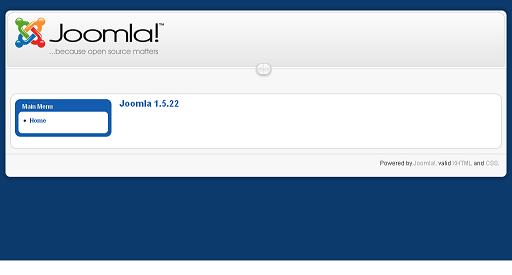 Remeber if you had entered any additional data other than default , then it may deleted.
Run the following SQL queries.
TRUNCATE TABLE `jos_banner`;
TRUNCATE TABLE `jos_bannerclient`;
TRUNCATE TABLE `jos_bannertrack`;
TRUNCATE TABLE `jos_categories`;
TRUNCATE TABLE `jos_content`;
TRUNCATE TABLE `jos_content_frontpage`;
TRUNCATE TABLE `jos_newsfeeds`;
TRUNCATE TABLE `jos_polls`;
TRUNCATE TABLE `jos_poll_data`;
TRUNCATE TABLE `jos_poll_date`;
TRUNCATE TABLE `jos_sections`;
TRUNCATE TABLE `jos_weblinks`;
TRUNCATE TABLE `jos_contact_details`;
TRUNCATE TABLE `jos_menu`;
INSERT INTO `jos_menu` VALUES (1, 'mainmenu', 'Home', 'home', 'index.php?option=com_content&view=frontpage', 'component', 1, 0, 20, 0, 1, 0, '0000-00-00 00:00:00', 0, 0, 0, 3, 'num_leading_articles=1\nnum_intro_articles=4\nnum_columns=2\nnum_links=4\norderby_pri=\norderby_sec=front\nshow_pagination=2\nshow_pagination_results=1\nshow_feed_link=1\nshow_noauth=\nshow_title=\nlink_titles=\nshow_intro=\nshow_section=\nlink_section=\nshow_category=\nlink_category=\nshow_author=\nshow_create_date=\nshow_modify_date=\nshow_item_navigation=\nshow_readmore=\nshow_vote=\nshow_icons=\nshow_pdf_icon=\nshow_print_icon=\nshow_email_icon=\nshow_hits=\nfeed_summary=\npage_title=\nshow_page_title=1\npageclass_sfx=\nmenu_image=-1\nsecure=0\n\n', 0, 0, 1);
TRUNCATE TABLE `jos_modules`;
INSERT INTO `jos_modules` VALUES (1, 'Main Menu', '', 1, 'left', 0, '0000-00-00 00:00:00', 1, 'mod_mainmenu', 0, 0, 1, 'menutype=mainmenu\nmoduleclass_sfx=_menu\n', 1, 0, '');
INSERT INTO `jos_modules` VALUES (2, 'Login', '', 1, 'login', 0, '0000-00-00 00:00:00', 1, 'mod_login', 0, 0, 1, '', 1, 1, '');
INSERT INTO `jos_modules` VALUES (3, 'Popular','',3,'cpanel',0,'0000-00-00 00:00:00',1,'mod_popular',0,2,1,'',0, 1, '');
INSERT INTO `jos_modules` VALUES (4, 'Recent added Articles','',4,'cpanel',0,'0000-00-00 00:00:00',1,'mod_latest',0,2,1,'ordering=c_dsc\nuser_id=0\ncache=0\n\n',0, 1, '');
INSERT INTO `jos_modules` VALUES (5, 'Menu Stats','',5,'cpanel',0,'0000-00-00 00:00:00',1,'mod_stats',0,2,1,'',0, 1, '');
INSERT INTO `jos_modules` VALUES (6, 'Unread Messages','',1,'header',0,'0000-00-00 00:00:00',1,'mod_unread',0,2,1,'',1, 1, '');
INSERT INTO `jos_modules` VALUES (7, 'Online Users','',2,'header',0,'0000-00-00 00:00:00',1,'mod_online',0,2,1,'',1, 1, '');
INSERT INTO `jos_modules` VALUES (8, 'Toolbar','',1,'toolbar',0,'0000-00-00 00:00:00',1,'mod_toolbar',0,2,1,'',1, 1, '');
INSERT INTO `jos_modules` VALUES (9, 'Quick Icons','',1,'icon',0,'0000-00-00 00:00:00',1,'mod_quickicon',0,2,1,'',1,1, '');
INSERT INTO `jos_modules` VALUES (10, 'Logged in Users','',2,'cpanel',0,'0000-00-00 00:00:00',1,'mod_logged',0,2,1,'',0,1, '');
INSERT INTO `jos_modules` VALUES (11, 'Footer', '', 0, 'footer', 0, '0000-00-00 00:00:00', 1, 'mod_footer', 0, 0, 1, '', 1, 1, '');
INSERT INTO `jos_modules` VALUES (12, 'Admin Menu','', 1,'menu', 0,'0000-00-00 00:00:00', 1,'mod_menu', 0, 2, 1, '', 0, 1, '');
INSERT INTO `jos_modules` VALUES (13, 'Admin SubMenu','', 1,'submenu', 0,'0000-00-00 00:00:00', 1,'mod_submenu', 0, 2, 1, '', 0, 1, '');
INSERT INTO `jos_modules` VALUES (14, 'User Status','', 1,'status', 0,'0000-00-00 00:00:00', 1,'mod_status', 0, 2, 1, '', 0, 1, '');
INSERT INTO `jos_modules` VALUES (15, 'Title','', 1,'title', 0,'0000-00-00 00:00:00', 1,'mod_title', 0, 2, 1, '', 0, 1, '');
TRUNCATE TABLE `jos_modules_menu`;
INSERT INTO `jos_modules_menu` VALUES (1,0);
TRUNCATE TABLE `jos_menu_types`;
INSERT INTO `jos_menu_types` VALUES (1, 'mainmenu', 'Main Menu', 'The main menu for the site');
TRUNCATE TABLE `jos_templates_menu`;
# Dumping data for table `jos_templates_menu`
INSERT INTO `jos_templates_menu` VALUES ('rhuk_milkyway', '0', '0');
INSERT INTO `jos_templates_menu` VALUES ('khepri', '0', '1');

